Showing posts with label Help:Infected computers. Show all posts

Friday, 1 July 2016

How to increase RAM of computer

How to Increase RAM in Window 7/8/10

Hi guys, I am back with a useful article which can increase your pc’s speed.  If you are a game lover, and can’t run your favorite game due to low ram, then this post will help you. Suppose you bought a pc for your college/office use. Then you realize this pc couldn’t satisfy your requirements. This hasn’t enough ram to run required application or games. Usually people buy a low ram pc due to not knowledge of RAM or due to low budget.
Low RAM is main reason of slow computer. There two methods to increase your ram.
1.     Adding extra physical RAM
2.     Using virtual RAM
Not every computer support dual slot to add extra physical RAM and physical ram are more expansive than ordinary memory chip.  In this Post, we will use virtual ram to increase your computer ram. We will use your Hard Disk Space for this purpose. Don’t worry you don’t need to download any third party software.


What is RAM and Virtual Memory in Window computer or laptop?


RAM is used for random access memory. RAM is primary and faster memory than other storage memory. When a program run, all data of this program stored in RAM. All process such as calculation, decisions is executed in RAM and results are stored in secondary storage devices such as hard disk. RAM is found in every device such computer, mobile, printers etc.
When computer lacks the RAM needed to run a game, program, in window os, window uses Virtual memory to store temporary data. Virtual memory uses your space available on hard disk. When RAM doesn’t have space to store additional data, virtual memory move data file RAM to paging file (space).

How to increase RAM using Virtual memory size


1.     In window 7, first click on Start button then right-click on Computer and then click on Properties. You can also use this path control panel >> system and security>> System. Here you will find basic computer information such window version, processor, system type and RAM.

2.     Left side you will some additional setting such as device manager, remote setting, system protection, advance system settings. Click on Advanced system settings.
 
3.     A new will pop out, under Performance, click on Settings.

4.     Another window will pop-out. Click the Advanced tab, click on Change.
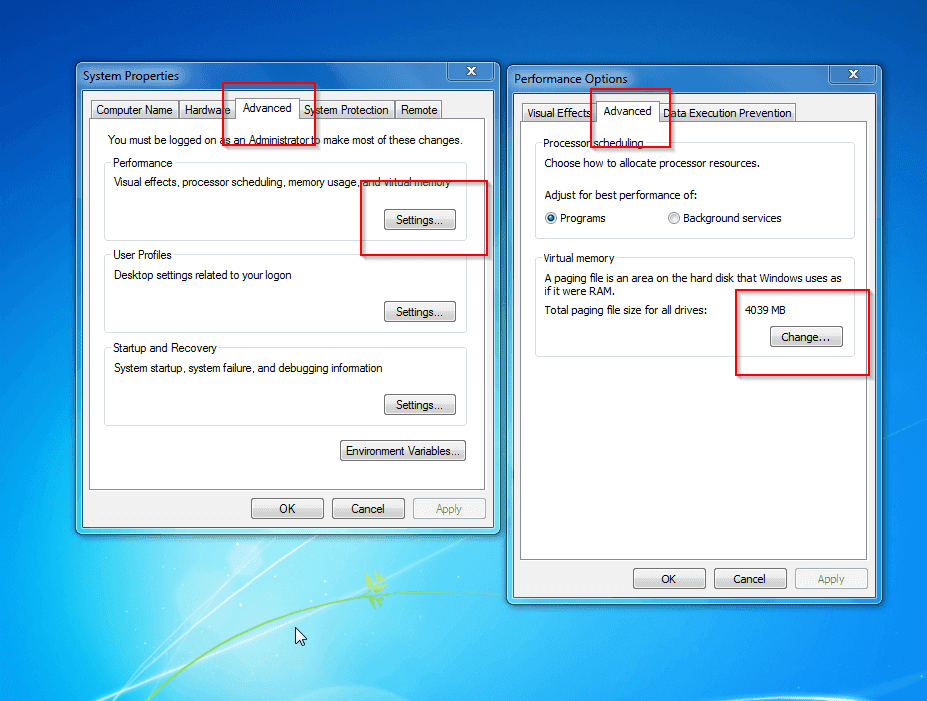
5.     Remove tick form the “Automatically manage paging file size for all drives” check box.
6.      Here you will see your drives, under Drive [Volume Label], click the drive that contains the paging file you want to change.
7.     Click Custom size, type a new size in megabytes in the Initial size (MB) or Maximum size (MB) box, click Set, and then click OK.


Remember in this trick you are not increasing size of physical RAM, instead you are giving an addition space (virtual memory) to your ram so that your computer work fast.
You can also buy new RAM for your computer and you can also use some premium software to increase your RAM.
This trick works fine in Window 7, Window 8 and Window 10.


continue reading How to increase RAM of computer

Tuesday, 1 March 2016

Help:Is my PC infected with Trojan Horse?

What is Trojan Horse Virus and How To Remove it

Infected pc by Trojan Horse
Today i came up with the influential computer problem, What is Trojan horse virus and how to Remove it? Now viruses can access in our computer through many ways like through Internet Browsing, From USB devices and also by installing some infected software.
These viruses cause our computer run slow and also some of the dangerous viruses can hijack our data. These viruses can also corrupt our operating systems. And the Trojan horse virus is the one of the critical types of viruses that can affect your computer a lot.
This virus has the skill to access your files and multiplies itself too. Just read out the below to have a complete information on this.
If a virus creates a text editor file that is used to access the location of other files and put them in the particular location that can be editable by that text editor file then the file is trojan horse file, which is basically designed to modify the user data without any authentication. Also, the other variant of trojan horse is spyware, this spyware generally comes with the freeware software and get install in your operating system and sends your personal identification information to the spying computer.

Method To Remove Trojan Horse Virus:

Just follow up the below steps to detect and complete remove trojan horse from your computer.

Uninstall The Unsafe Programs

Screenshot_2
First of all, you need to find any of the software that you might not install and it get automatically install on your computer, for that go to Control Panel>Uninstall a Program. Now there have a look at all the program and uninstall the program you might not install by self on your computer.


 Registry Edit


Registry detail


Press Window key + R at the same time, type in regedit, click HKEY_CURRENT_USER, Software, Microsoft, Windows, Current Version, Run and there have a look on the program that you might not know that you have installed. Now just completely look  for the suspect software and search it on google and google will tell you everything about that program. And if it is trojan then uninstall that.

Scan Through Your Updated Antivirus or Antimalware

Comodo-AntiVirus-For-Ubuntu
You can also remove this trojan by automatically by using anti malware and anti spyware, if you don’t have one then you can download one online.

Scan In Safe Mode

Safe Mode Full Scan
This is a must do process if you really want to get rid of Trojan horse Viruses. You just need to Login to your system in Safe Mode. You can get into safe mode my repeatedly pressing F8 button while your computer commence. You have to select Safe mode with networking and you just need to perform a full scan in Safe mode.
By taking care of all these steps you can easily get rid of the trojan horse virus from your computer.
So foregoing is all about What is Trojan horse virus and how to Remove it. By these arrangement presented above you can easily remove these infected files and spyware from your computer and can guarantee your security and secure your data from being contaminated by these. Hope you like our post, don’t forget to share this cool method with your loving ones to aware them about this computer threat. And leave a comment if you facing any trouble.
continue reading Help:Is my PC infected with Trojan Horse?